

+The maintenance product

Resyrv MRO: Run the shop from estimate to invoice.

Built for the people who turn the wrenches. Every job is a work order with its parts, labor clock, attachments and sign-off. Estimates go to the customer and become held jobs when approved. Parts, vendors and customers are the shop's own lists, and the invoice goes to whoever owns the airplane.

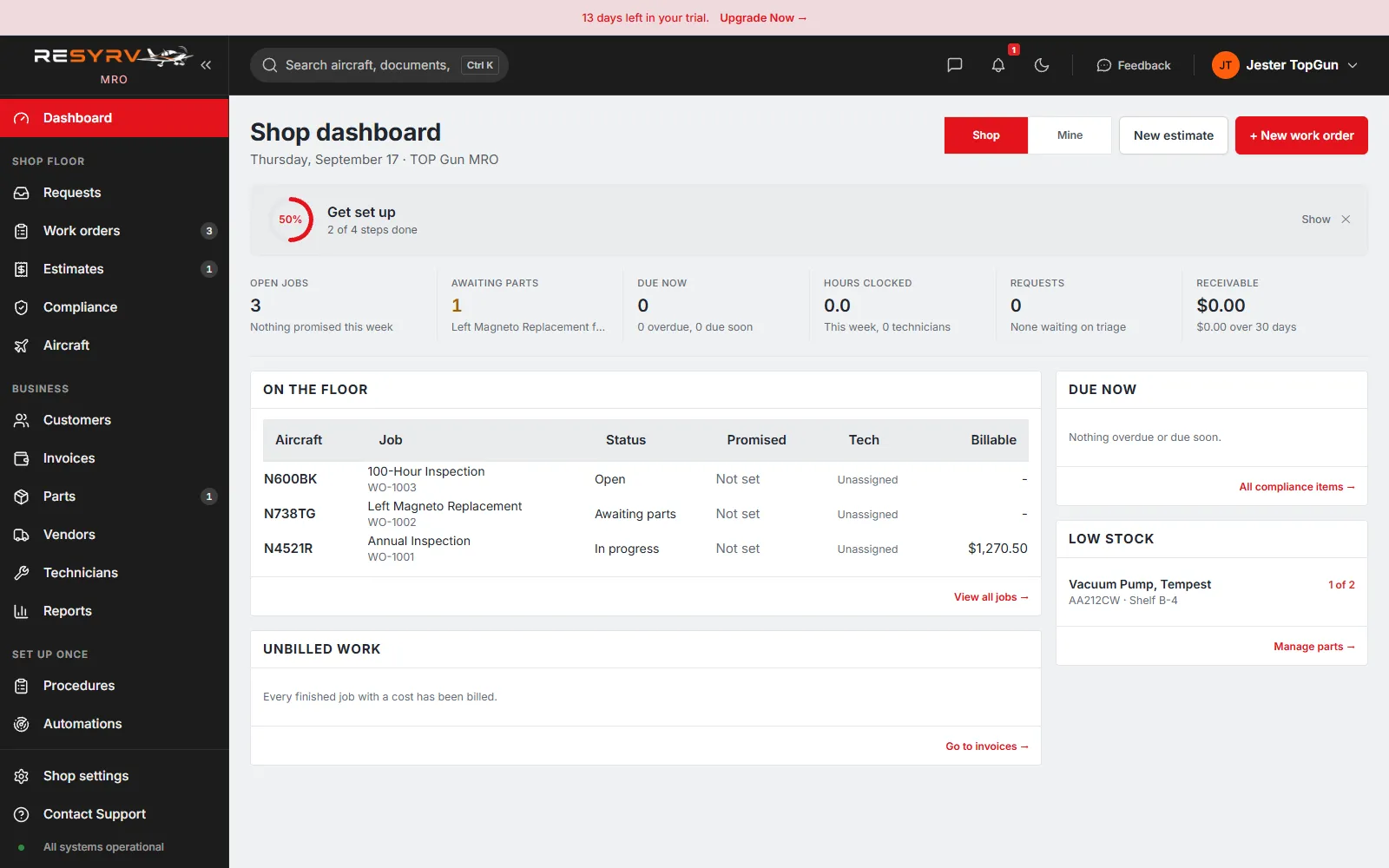
The Resyrv MRO shop dashboard: open jobs, awaiting parts, receivable, the jobs on the floor and low-stock parts

One record, start to finish

The whole job is one line, from the squawk to the invoice.

A shop runs on a flow, not a feature list: something comes in, it gets priced, somebody says yes, the work happens, it gets signed off, and it gets billed. Resyrv MRO is that flow on one record, so nothing is retyped from the estimate into the invoice.

  1. Step 01

    Request

    A customer reports a squawk from the link you sent. It lands in the inbox.

  2. Step 02

    Estimate

    You price the work and send it. The customer approves it from their phone.

  3. Step 03

    Held job

    An approved estimate becomes a job on the board, waiting for the floor.

  4. Step 04

    Work order

    Parts and labor go on as lines. The labor clock runs while the wrench turns.

  5. Step 05

    Sign-off

    Name, certificate number and return-to-service note recorded on the order.

  6. Step 06

    Invoice

    Labor, parts and fees total themselves and bill to whoever owns the airplane.

See the actual shop

Not a mockup. This is the shop running.

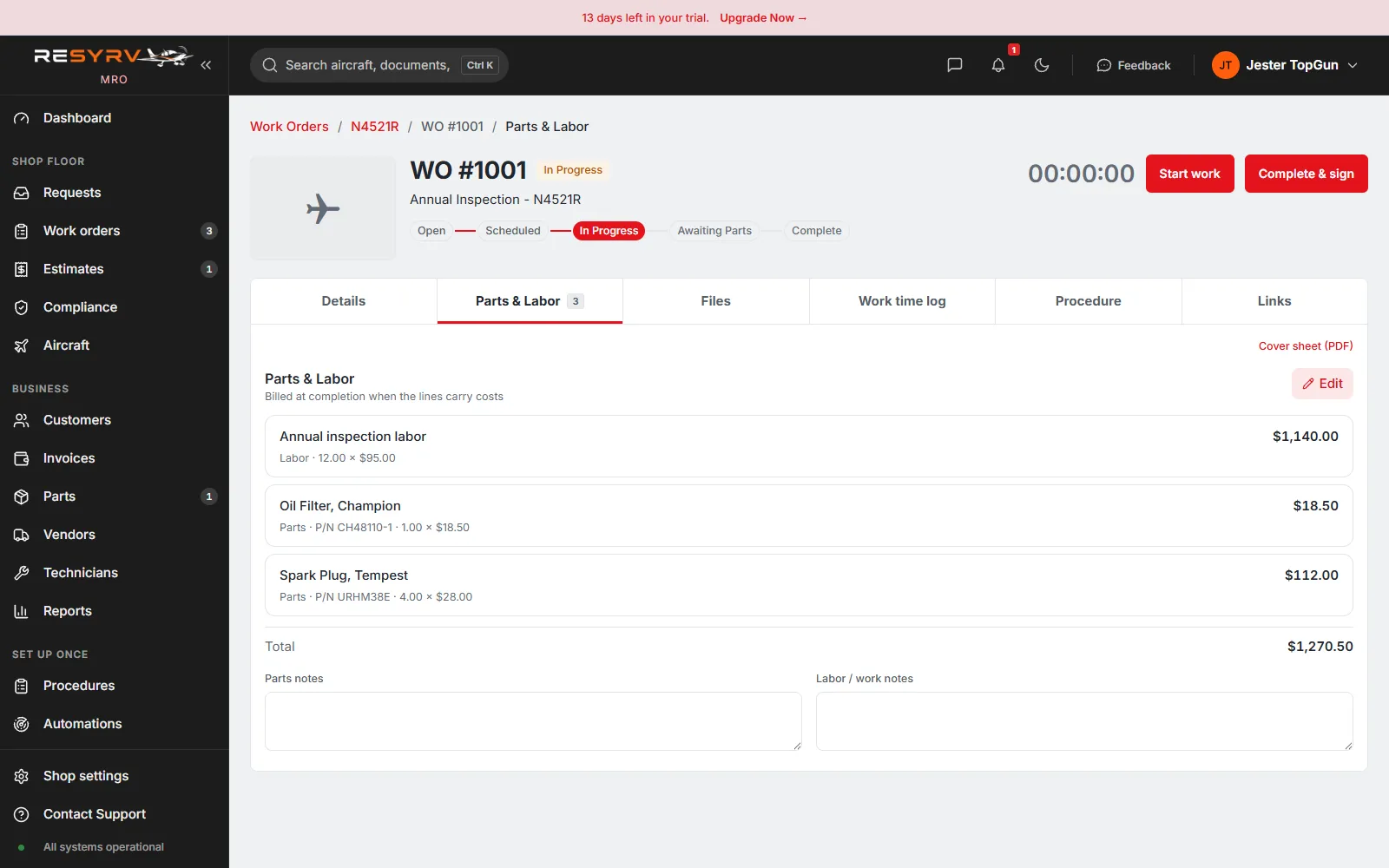
The work order

Parts and labor on one line, and the job totals itself.

A labor line at your rate, parts pulled onto the order with their number and cost, and the total adds up as you work. The clock at the top bills against the job, and Complete & sign closes it with a return-to-service note.

  • Labor at your shop rate
  • Parts with part number and cost
  • A clock you can bill against
A work order in Resyrv MRO showing labor and parts lines with quantities and prices totalling $1,270.50

The shop floor

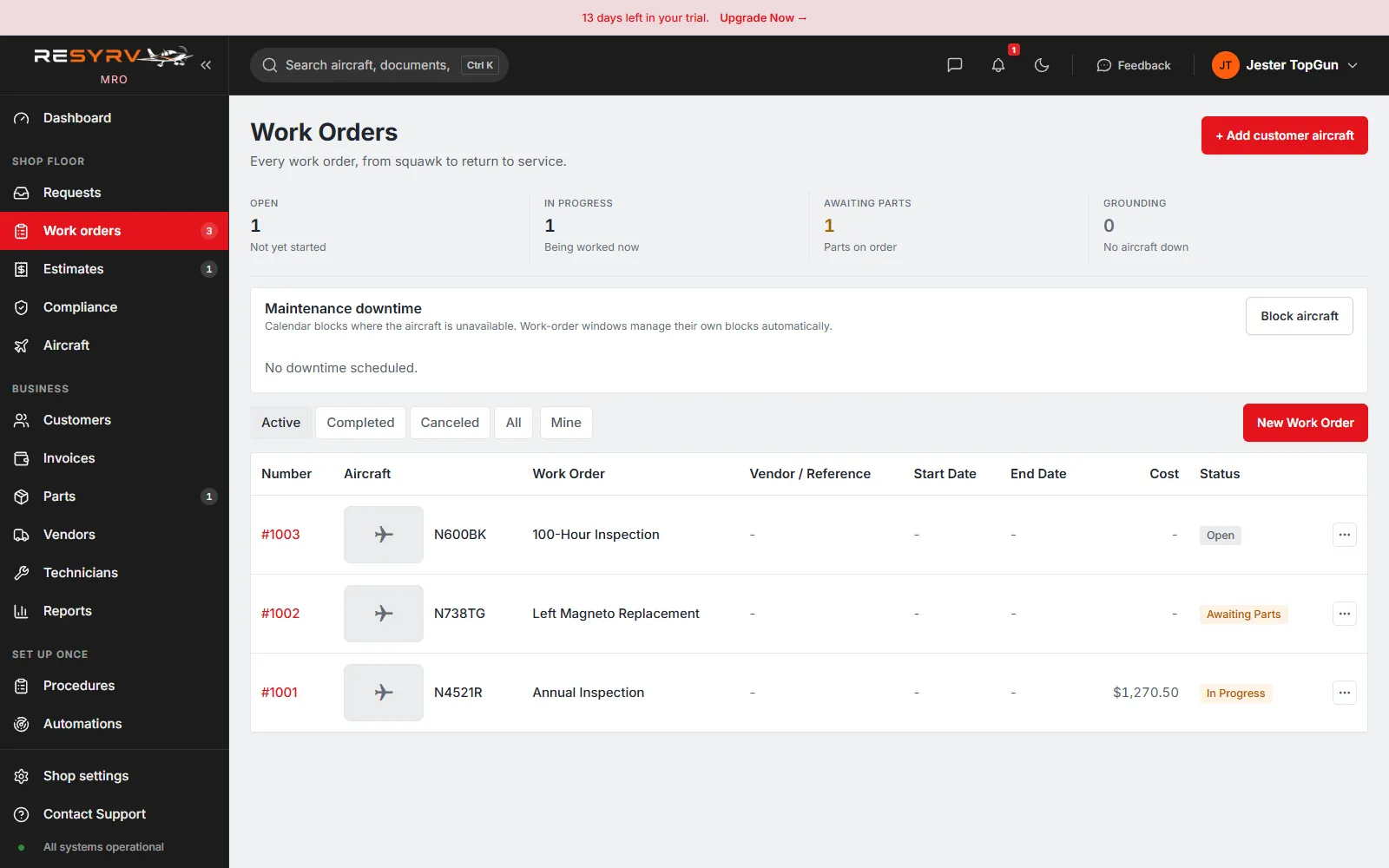
Every job on the board, and what state it is in.

Open, in progress, awaiting parts, grounding: the counts up top and the row for every tail on the floor. Nothing lives on a whiteboard, and the job that is waiting on a part is not the one you forget.

  • Status at a glance
  • Grounding that removes an aircraft
  • One row per tail
The Resyrv MRO work order board with jobs in Open, In Progress and Awaiting Parts, and the aircraft each is on

Parts and vendors

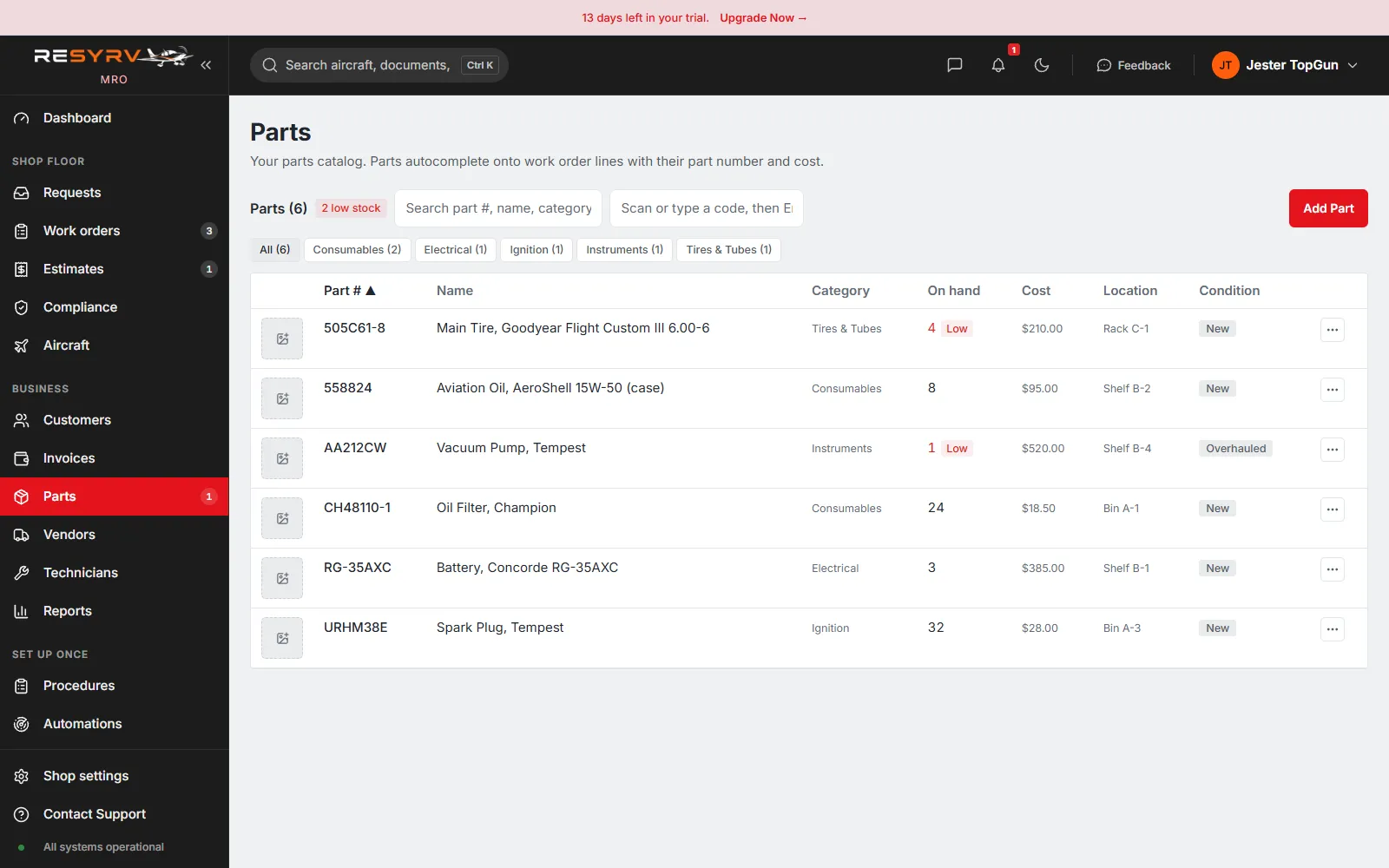
What is on the shelf, and what has fallen under the line.

A catalog with quantity on hand, unit cost, location and condition, and a low-stock flag the moment a part drops below its reorder minimum. Parts pulled onto a work order carry their number and price straight onto the job.

  • Reorder minimums that flag
  • Cost that flows onto the job
  • Vendors a reorder starts from
The Resyrv MRO parts catalog with quantity on hand, low-stock flags, unit cost, location and condition

Built for the people turning the wrenches

The estimate and the invoice are the same document, six steps apart.

Most shop software makes you build the estimate, then build the invoice again from scratch, hoping the numbers match. Here the estimate the customer approved is the job that gets worked and the invoice that gets sent. Parts and labor are entered once, on the work order, and they total the job on their own.

Underneath it is the day job: a labor clock you can bill against, a parts catalog that knows what has fallen under its reorder line, customers with the history of every tail you have touched, and a sign-off that an inspector will still accept two years from now.

  • Work orders with parts, labor and attachments
  • A start-stop labor clock per job
  • Estimates approved by link, no customer account
  • Approved estimates become held jobs automatically
  • Customers with their aircraft and full history
  • Parts catalog with reorder minimums, plus vendors
  • A requests inbox fed by the customer report link
  • Invoicing with labor rates, fees and a price book

What you get

01

Work orders that carry the whole job

Open a work order against a tail, assign the technician, and name the outside vendor if the work is going out. Parts and labor go on as separate lines with part number, serial, quantity and unit cost, so the job totals itself. Photos, quotes and paperwork attach to the order instead of living in somebody's email.

02

Estimates the customer actually approves

Price the work and send the estimate as a link. The customer opens it, reads the lines, and approves without an account. An approved estimate does not sit in an inbox: it becomes a held job on the board, priced and ready for the floor.

03

A labor clock, not a guess

Start and stop time against the work order as you work it, with a note on each entry. Mis-clocked time gets voided with a reason rather than deleted, so the hours you bill stay auditable after the fact.

04

Customers with their aircraft and their history

The owners and operators you work for are your own list, each with the tails you maintain for them and every job you have run. The next time a tail rolls in, its last visit is already there.

05

Parts and vendors on the shelf

A parts catalog with part number, quantity on hand, reorder minimum and unit cost, so you can see what has fallen under the line. Vendors sit alongside with contacts, so a reorder does not start with hunting for a phone number.

06

A requests inbox that becomes work

Send a customer the report link and their squawks arrive triaged in one place. Turn a request into a work order in a click; the description, the tail and the attachments come with it.

A sent estimate has one state everyone can see: pending, approved, or declined - with the date it changed.

Who this is for

The shop, however big the shop is

The independent repair shop

Walk-in customers, estimates that need a yes before the wrench turns, and jobs stacking up on the floor. The board shows what is quoted, what is approved and what is being worked, without a whiteboard.

The in-house maintenance department

The mechanic inside a club or a flight school keeping the fleet flying. Work orders, parts and labor hours live per tail, and the shop half stays separate from the flying half.

The mobile mechanic

One technician, many hangars, one record per tail. Estimates and invoices go out from a phone, and the customer approves from theirs.

The shop tired of paper estimates

An estimate emailed as a PDF gets lost, edited, or argued over. Here the version the customer approved is the one that gets worked and billed, so there is nothing to reconcile at the end.

The annual, reconstructed later

An insurer, a buyer or an inspector asks what happened to this airframe. Work orders, parts, labor, sign-offs and attachments are already in one place per tail, with dates.

Knowing what the shop actually makes

Completed work orders total their labor, parts and fees. You can see what a job earned instead of finding out at the end of the quarter.

Written for the person signing it off

The technician is the second reader of every shop product and usually the last one considered. The record Resyrv MRO keeps is the one an IA, an insurer or a buyer asks for two years later, and the one that keeps a billing dispute from becoming your word against theirs.

  • Sign-off records the name and certificate number of whoever performed and approved the work.
  • The maintenance release and a return-to-service note are stored on the order, not retyped from memory.
  • Attachments hold the paperwork: 8130s, quotes, and photographs of what was actually found.
  • Labor rates, shop fees and a price book are set once and applied to every job, so the total is not a negotiation.
  • Maintenance is permission-gated: a technician can work the floor without any reach into shop money or settings.

Pricing

One flat plan for the shop.

No per-aircraft or per-user add-ons. Start with a free trial and no card.

Pricing information is currently unavailable. Start your free trial →

See all plans

Questions worth asking us

01

Does Resyrv MRO actually invoice our maintenance customers?

Yes. This is the shop product, and it is built around exactly that: an estimate goes to a third-party customer, they approve it, the work runs as a work order, and it becomes an invoice billed to whoever owns the airplane, with labor, parts and shop fees on it. That is the difference from Resyrv's flying product, which only posts maintenance cost to the owners of a shared aircraft and has no customer invoice at all.

02

How is this different from the maintenance tracking in the flying product?

The flying product tracks airworthiness for a group that shares an airplane and posts cost to those owners. Resyrv MRO is for a shop that sells labor to other people's aircraft: customers, estimates, approvals, and invoices with accounts receivable. Same company, two products, sold and run separately. A shop signs up on its own workspace at mro.resyrv.com.

03

How do customers approve an estimate or report a problem?

By a link, with no account. You send an estimate and the customer opens it, reads the lines, and approves or declines from their phone. The same is true for the request link: a customer reports a squawk and it arrives in your inbox, ready to become a work order. Nobody you work for has to be a Resyrv user.

04

Is this a full parts inventory system?

It is a catalog with a reorder minimum, so you can see what has fallen below the line, and parts pulled onto a work order carry their number, serial, quantity and cost onto the job total. It is not a full inventory system with automatic depletion and purchase orders. If you run a stockroom as its own business, it will feel thin.

05

Who in the shop can see and do what?

Maintenance work is permission-gated separately from shop money and settings. A technician can be given the work orders and the labor clock without any access to invoicing, labor rates or the price book, which stay with a manager. Every action carries an audit trail.

06

Do we need the flying product to use this?

No. Resyrv MRO stands on its own. If you also run shared aircraft, the two products are sold separately and do not require each other.

Get started

See it with your own shop.

Add a customer and an aircraft, write the first work order, and send the estimate. No card required.