

Work orders
Parts and labor lines
The Parts & labor tab is what the customer will be billed for. Estimates use the same editor, so a line built on an estimate carries straight onto the job.
Line types
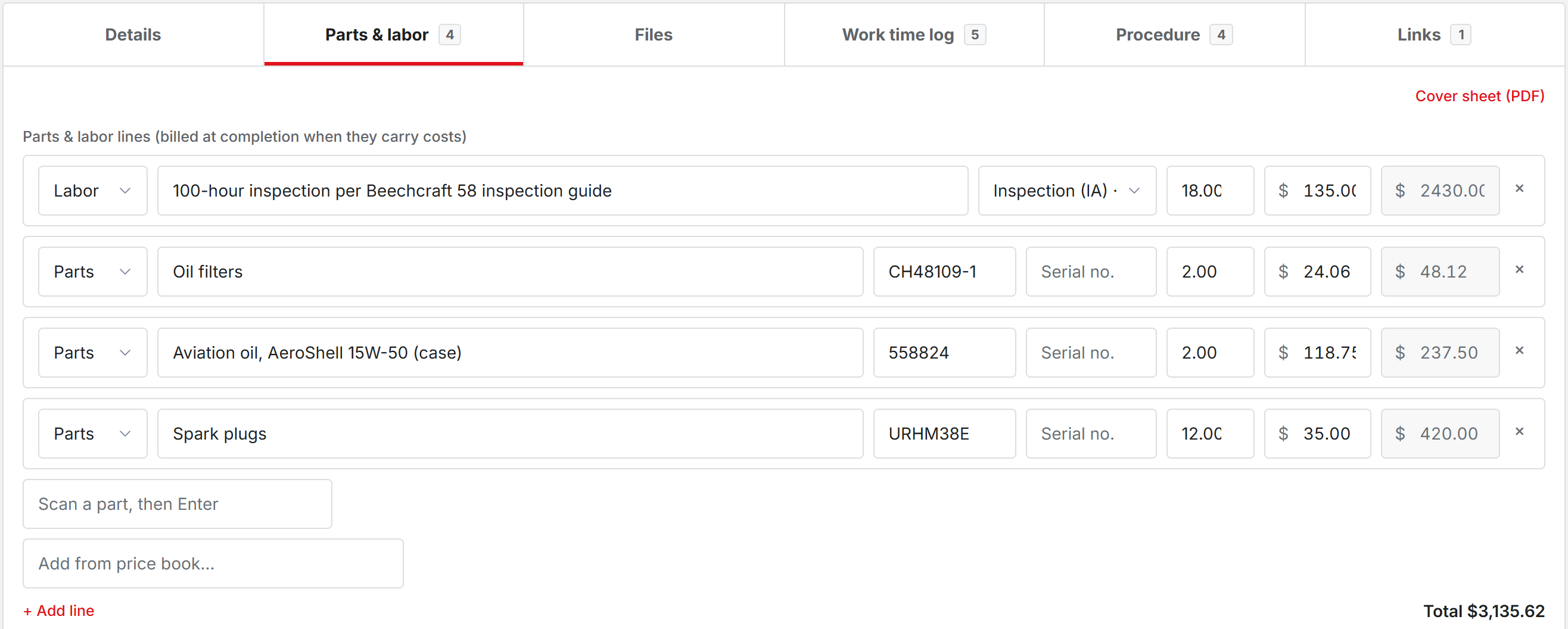
- Labor: what was done, a labor rate from your list or Custom, and hours.
- Parts: a description, part number, serial number, and quantity. Start typing and the parts catalog suggests matches.
- Other: anything else, as a quantity and unit price or a flat amount.
Click + Add line to add one. The amount works itself out while quantity and unit price are both filled in.
Faster ways in
Add from price book puts one of your flat-rate jobs on as a single line at its set price.
The scan field takes a barcode. Scan a part, then press Enter. If the code is not in your parts catalog, it tells you so, and you add the part there or attach the code to an existing one.
Markup and fees
A part from the catalog comes onto the job already marked up, using the part’s own markup or your shop’s parts markup. Leave the shop setting blank to bill parts at cost.
Fees set to apply to every job, like shop supplies, are added to each new work order by themselves. They show a Fee tag and cannot be edited on the job. A percent-of-labor fee updates whenever the labor changes.
Who sees prices
If your shop hides hourly rates from technicians, their time entries show no rate. The shop can also hide labor dollar amounts on work orders. Parts and other line prices stay visible either way.
Set up your shop: rates and fees
Invite your staff and pick roles
Was this page helpful?
Can’t find what you need? Contact us - a real person reads every message.