

Customers
Customer list and profile
Customers are the people and businesses whose aircraft you work on. They are not staff, and they never need to sign in.
The list
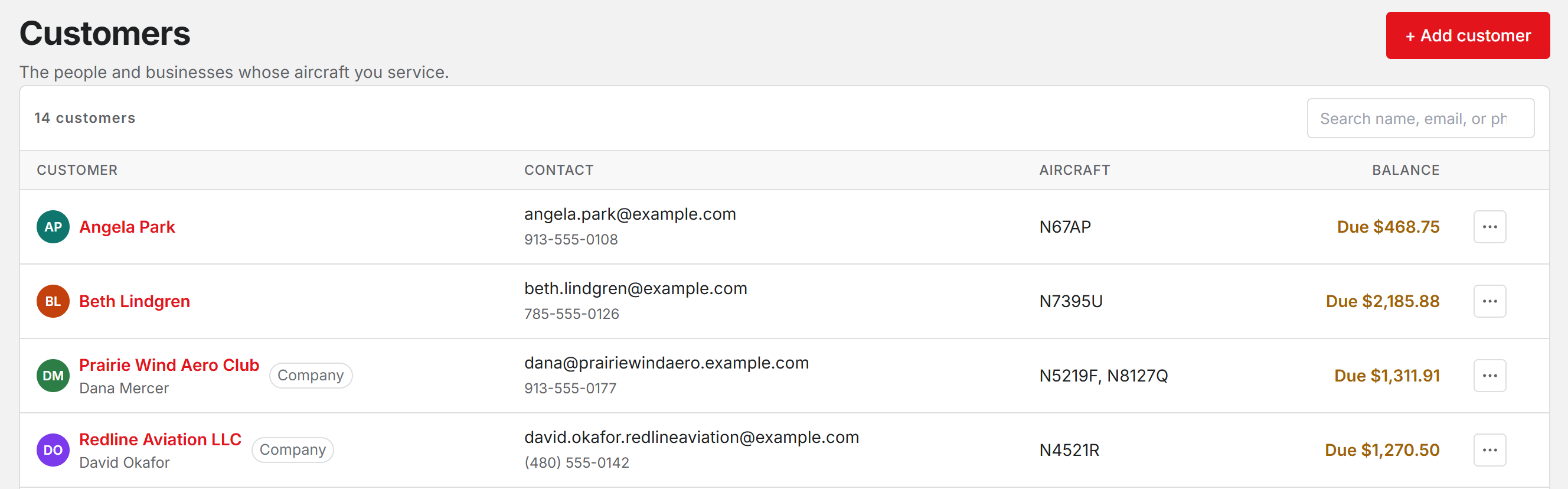
Open Customers in the sidebar. Each row shows the customer, their email and phone, the tail numbers on file, and their balance. A business shows its company name with a Company tag, and the person under it is the contact.
Search matches a name, email, or phone number.
The profile
Click a customer to open their record. It shows their contact details and balance, the aircraft on file, and their invoices with status, issue date, and total.
Estimates and work orders are not listed here. Find those on Estimates and Work orders.
Record payment logs money you took outside Resyrv, by cash, check, or other, against what they owe. Only people allowed to record payments see the button.
Edit a customer
Click Edit to change the name, email, phone, or company name. Email stays required.
If the customer signs in to Resyrv, their email is locked. They sign in with it, so only they can change it from their own account.
Remove a customer
Click Remove, then Remove customer. They drop off your customer list and their report link stops working. Their invoices and anything they owe stay on record.
Open invoices or open work do not block a removal, so check the balance first. To bring someone back, add them again with the same email.
Add a customer and their aircraft
Was this page helpful?
Can’t find what you need? Contact us - a real person reads every message.