

Invoicing and payments
Sales tax on shop work
Sales tax is off until you turn it on. You set one default rate, then decide separately whether labor, parts and other charges are taxed.
Setting it up
In Shop settings, open Sales tax and turn tax on. Enter your default rate as a percent and the label that prints on invoices; it starts as Sales Tax.
Below that are three rows, one for each kind of charge a shop makes:
- Service - labor, for labor lines.
- Service - parts, for parts lines.
- Service - other, for everything else, including shop fees and price book items.
Switch Taxable on for the rows your state taxes. A row with an empty rate uses the default; type a rate in a row to use a different one for that kind of charge.
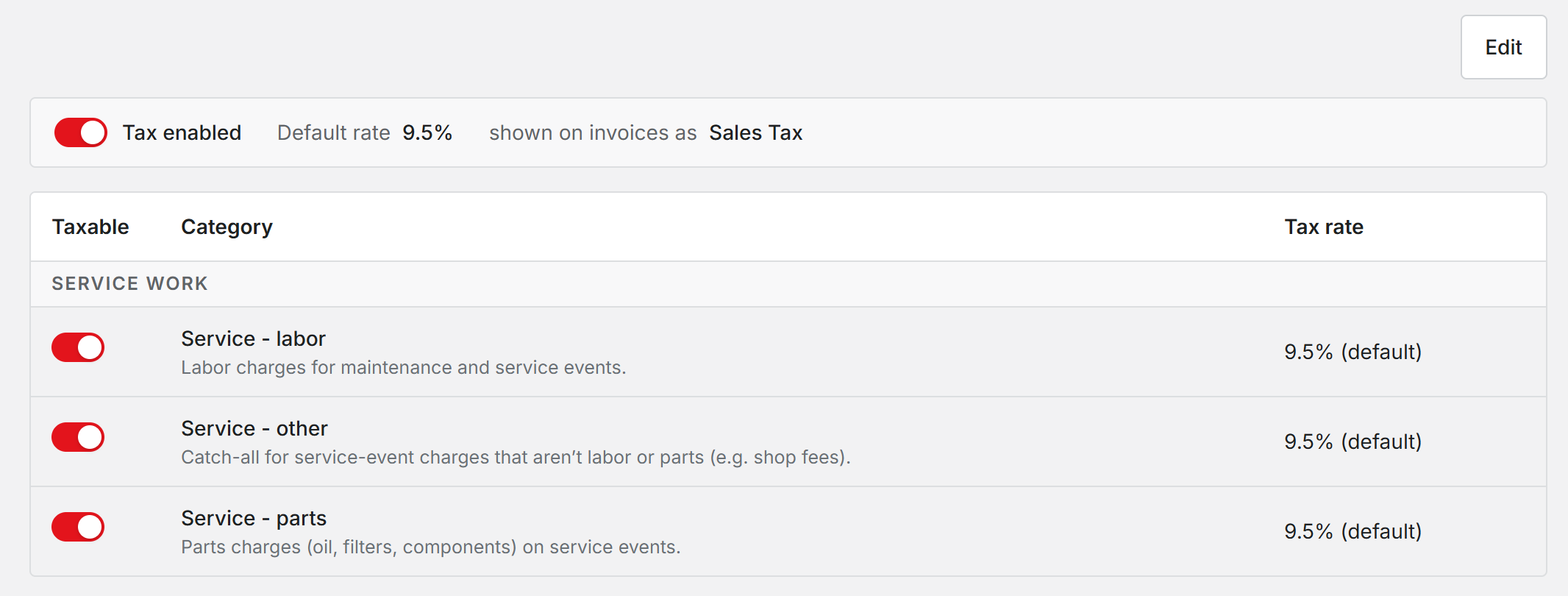
While tax is off, your settings are kept and nothing is taxed.
How the tax is worked out
Tax is worked out on each job's total for labor, for parts and for other, not line by line. That is why the tax on an invoice can differ by a cent from adding up tax on each line yourself.
An estimate shows the tax the same way the invoice will. Once the customer approves or declines, the estimate keeps that total even if you change your tax settings later. The invoice uses your settings as they are when the job is completed.
Who can change it
Administrators and Office staff. Late fees are never taxed.
Resyrv applies the rates you enter. It does not look up rates by address or file returns. The sales tax report on the Reports page gives you the totals to file with.
Was this page helpful?
Can’t find what you need? Contact us - a real person reads every message.