

Scheduling
Booking Rules & Checkouts
Most groups don’t want every member booking every aircraft on day one. Checkouts and location rules let you express exactly who may fly what.
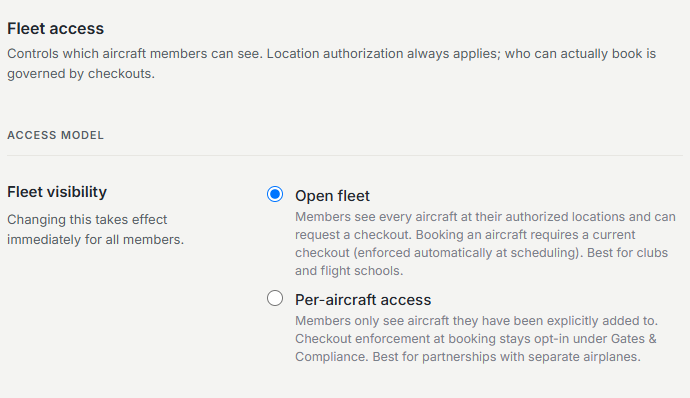
Open fleet by default
Out of the box an organization runs in open fleet-access mode. Members can book any aircraft based at a location they’re authorized for. Small partnerships often never need more than this.
Checkout requirements
For clubs and schools, put a checkout gate on an aircraft. Once the gate is on, a member must hold a recorded checkout for that aircraft before the schedule will let them book it. Checkouts are tracked per member, per aircraft, and are typically signed off after a flight with an instructor.
Requesting a checkout as a member
A member who doesn’t yet hold a required checkout still sees the aircraft, but instead of booking they’re prompted to request a checkout. That request goes to instructors or admins to schedule and sign off, so the path from “I want to fly this” to “I’m cleared” lives inside the app.
Recording a checkout
An instructor or admin records the checkout against the member and aircraft. From that moment the schedule treats them as cleared, and the checkout shows on their profile for the whole group to rely on.
The Checkouts Pagethe fleet-wide view of who is checked out on what, and group checkouts.
Authorized locations
In multi-base organizations each member carries a list of authorized locations. Aircraft whose home base is outside that list don’t appear as bookable - useful when insurance or club policy ties members to a particular field.
Was this page helpful?
Can’t find what you need? Contact us - a real person reads every message.