

Billing & Cost Sharing
Invoices & Statements
Once charges are on the ledger, an invoice is a view of real ledger activity, and a statement is a member’s month on one clean page.
Generating an invoice
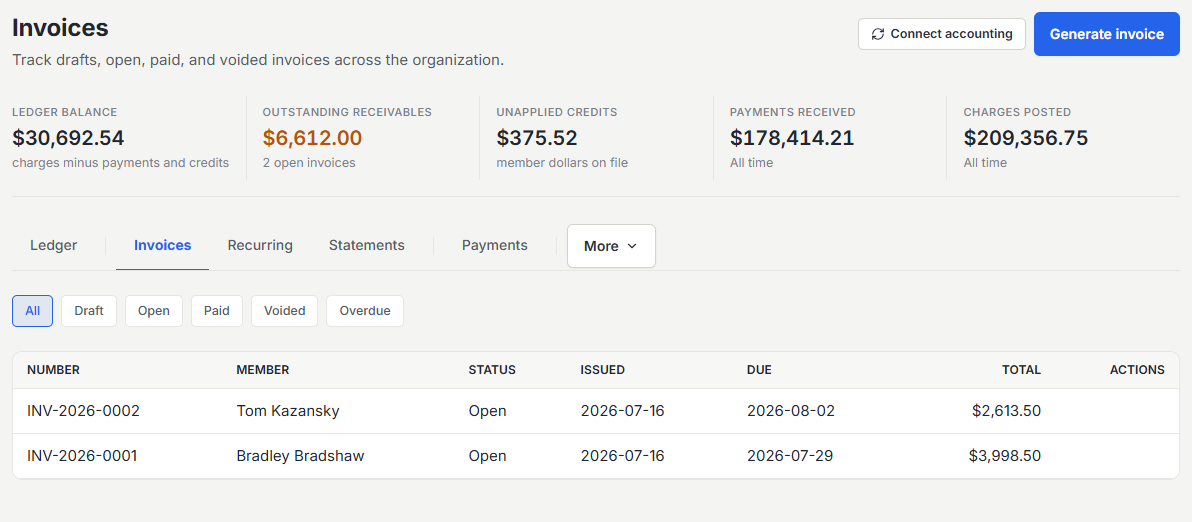
Create an invoice for any member from their outstanding ledger activity. Line items pull straight from the ledger, so an invoice always reflects real charges, never a hand-typed figure that drifts away from what the member did.
The invoice lifecycle
An invoice moves from draft to sent to paid. As payments post to the ledger, they clear the charges the invoice covers, and the invoice reflects what remains due. Because the invoice is anchored to the ledger, a partial payment or an added charge is never lost.
When an invoice goes unpaid
Members get a reminder before the due date and another after it, and autopay retries failed payments on its own schedule. When an invoice stays open past a threshold you set (30 days by default, under Settings then Invoicing), Resyrv escalates to your staff. Billing admins get an email naming the member, the invoice, and how far past due it is. Every Monday a single aging digest sums up everything overdue in 30, 60, and 90-day buckets, so nothing sits open unnoticed, even invoices old enough that member-facing reminders have stopped.
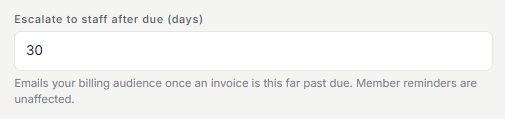
Escalation only informs. It never charges late fees or suspends anyone, and what to do about a chronic non-payer stays a human decision.
Monthly statements
A statement gives a member a clean PDF of a month’s activity and their balance: every flight, due, fuel credit, and payment, ending in the amount they owe. Statements are ideal for members who want a periodic summary rather than an invoice per charge.
PDF styling and your logo
All Resyrv PDFs (invoices, statements, and reports) share one print system with a small set of skins, and each carries your organization’s logo. Set the logo once and it appears consistently across every document members receive.
Was this page helpful?
Can’t find what you need? Contact us - a real person reads every message.