

Billing & Cost Sharing
Reserve Funds
A reserve fund is a named pot for a bill you know is coming (the engine overhaul, the annual, new paint). Resyrv accrues money into each fund as the aircraft flies, and keeps every balance visible so the group can see the overhaul is funded before it’s due.
Turning reserves on
Reserve funds are off by default. Turn them on under Settings then Maintenance Billing. If your reserves already live in your own accounting system, leave them off. Switching off later hides the pages but deletes nothing; balances and history return if you switch back on.
Funds
Every aircraft starts with three seeded funds (engine overhaul, annual inspection, and maintenance), and you can add any fund you like: paint, avionics, new seats. Each organization also has one built-in General fund with no aircraft attached; it’s where card processing fees are recorded and the usual partner for transfers. Funds are never deleted. Retire one and its history stays attached, ready to restore.
Setting the rate
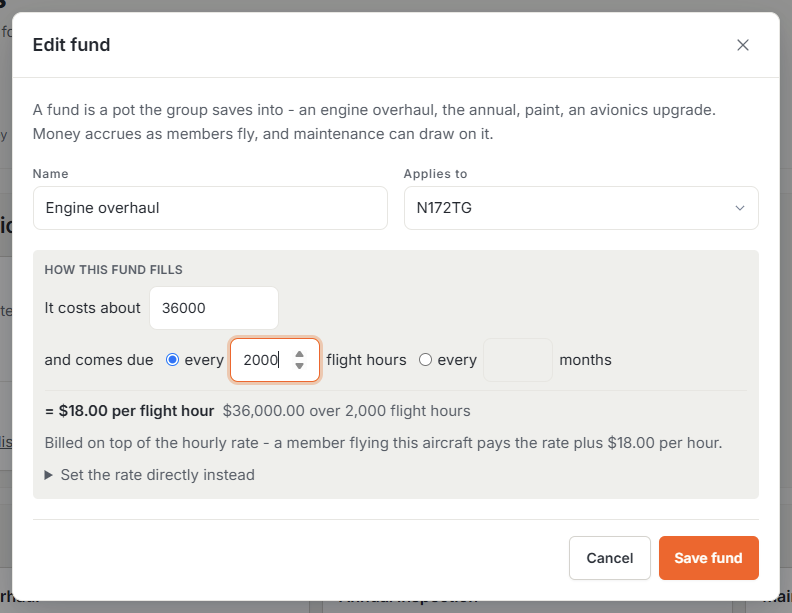
You don’t have to compute the per-hour number yourself. In the fund editor, describe the bill in plain terms (“it costs about $9,000 and comes due every 2,000 flight hours”) and Resyrv shows the math live: $4.50 per flight hour. Calendar-based funds (“every 12 months”) also ask how much the aircraft flies per month, since the honest rate depends on it. The cost you enter doubles as the fund’s goal, so every fund card shows a progress bar toward it. If you’ve already worked out your own number, you can set the rate directly instead.
How reserves hit the bill
One organization-wide choice under Maintenance Billing decides how the accrual reaches members:
- Added to the rate - a $100/hr aircraft with $27/hr of reserves bills $127, itemized as separate lines. The default, and the right answer when the people flying are the people who own the aircraft.
- Included in the rate - a $127/hr aircraft bills $127, and the accrual comes out of that. The member sees one number.
- Included, and shown - bills the same as included, but the rental line notes what it contains, so members see where their money goes without being charged extra.
Watching the balances
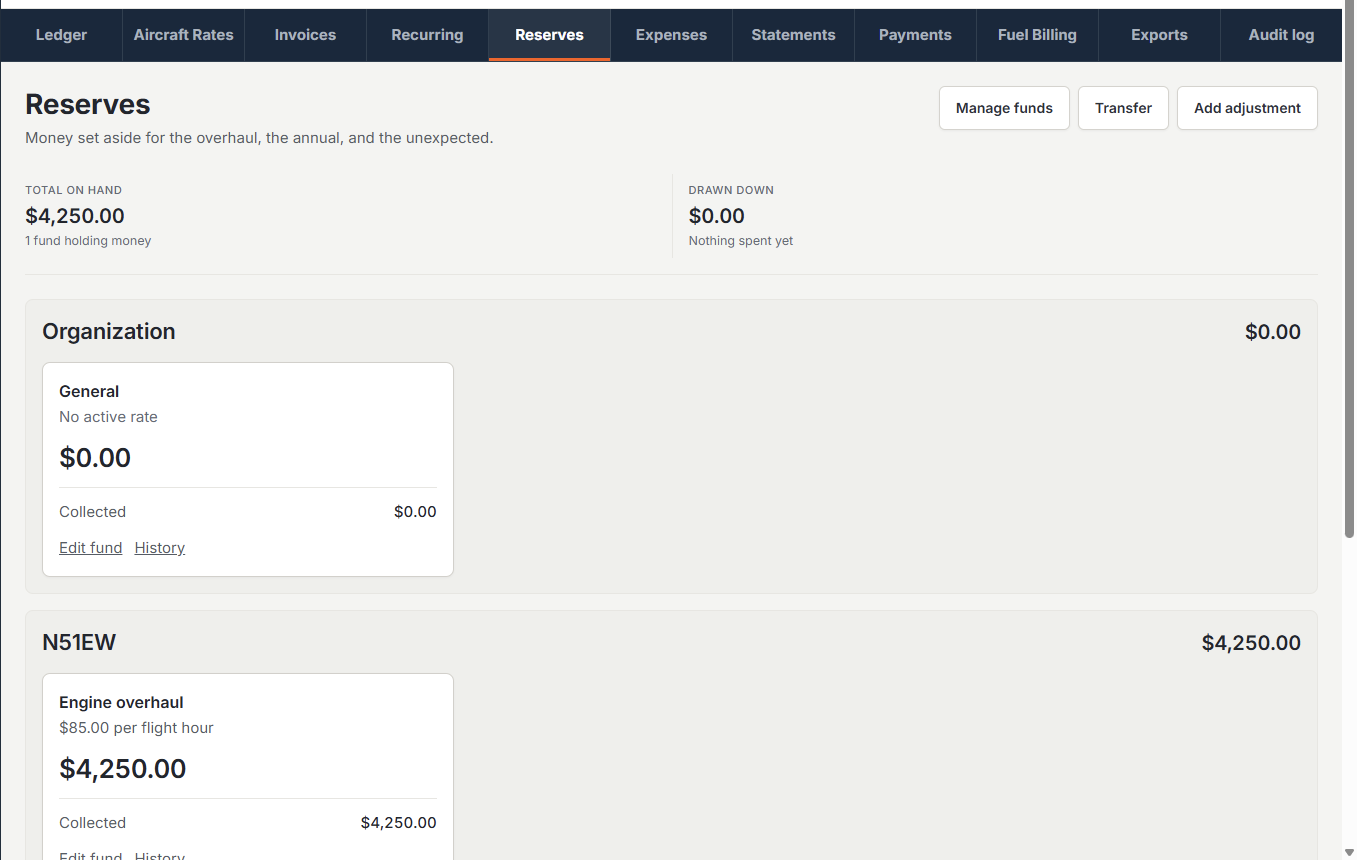
Billing then Reserves shows every fund grouped by aircraft: the balance, the rate, progress toward the goal, and what’s been billed but not yet paid. Reserve money only counts once a member pays, so the balance is money already collected. If you set your processor’s fee rate under Settings then Payments, each card also shows an approximate after-fees figure. Out of the box only owners, admins, and managers can open this page. Reserve access is its own permission pair under Settings then Roles & Access. Grant "View reserve funds" to your Member group if you want every member watching the funds they’re paying into grow, or to a single treasurer who shouldn’t see the rest of the billing section.
Transfers, adjustments, and drawdowns
Finance admins can transfer between funds (with a required note), add an adjustment for an opening balance brought in from before Resyrv, and every maintenance drawdown lands in a running table. When a repair posts against a fund, the fund pays first. By default a fund can’t be overdrawn, so the post is refused until the fund holds enough, unless you allow negative balances and settle up later.
Was this page helpful?
Can’t find what you need? Contact us - a real person reads every message.