

Getting Started
Your Pilot Profile
Your pilot profile is the record your organization relies on. Keeping it current means currency tracking, checkouts, and a printable summary stay accurate.
Where it lives
Your qualifications live under Settings, organized into tabs (Certificates & Ratings, Medical, Flight Review, Insurance, and Documents). A status strip across the top shows what is current and what is coming due.

Certificates and ratings
Record your pilot certificate (level, issuing authority, number, and FAA Tracking Number), then stack your ratings on top: category and class, instrument, type ratings, and any limitations. Instructor certificates are captured separately; per current FAA rules, CFI certificates no longer carry an expiry.
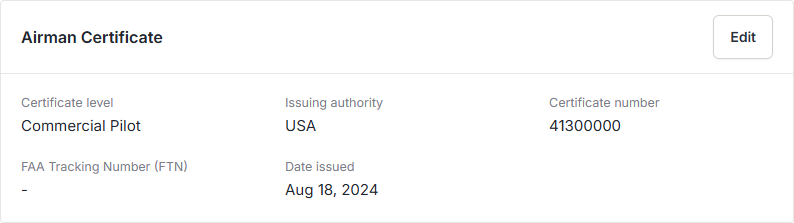
FAA endorsements go here too. Log each signoff with its type, the date, and the signing CFI’s name and certificate number, so the paper trail is intact.
Medical
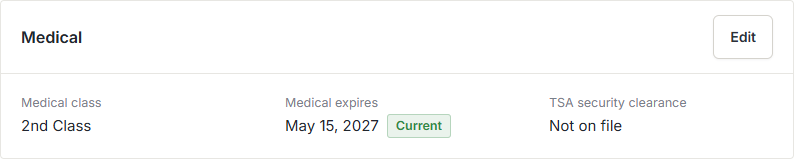
Enter your medical class and its expiry date. The status strip flags it as Active, Expiring Soon, or Expired so a lapse never sneaks up on you.
Flight review and IPC
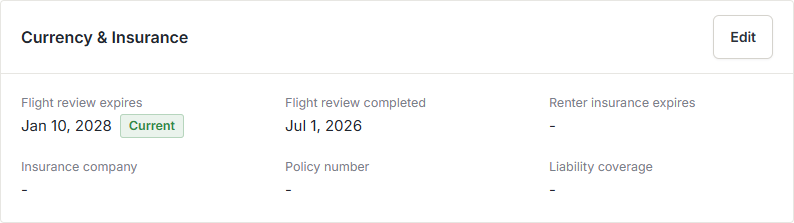
Enter the date your flight review was conducted and the signing CFI, and Resyrv computes the next-due date for you per 14 CFR 61.56, the last day of the 24th calendar month after completion. Instrument Proficiency Checks are tracked on the same tab, with currency lapsing six calendar months after the last completed check.
Renter insurance
If you carry renter insurance, record the company, policy number, effective and expiry dates, and liability limits. Its expiry joins the same recency strip as your medical and flight review.
Documents and expiry tracking
Scans (logbook pages, certificate copies, medical records) live on your Documents page, where files can carry expiry dates that surface as they approach. Your organization can also mark certain documents as required, so you know exactly what to upload.
Download a one-page record
The Download PDF button on the qualifications page produces a single-page pilot record (certificates, ratings, and currency dates), handy for a checkout or your own files.
Was this page helpful?
Can’t find what you need? Contact us - a real person reads every message.