

Billing & Cost Sharing
Organization Expenses
The member ledger records what people owe the club. The Expenses page is the club checkbook, what the club itself spends.
Three ways money gets in
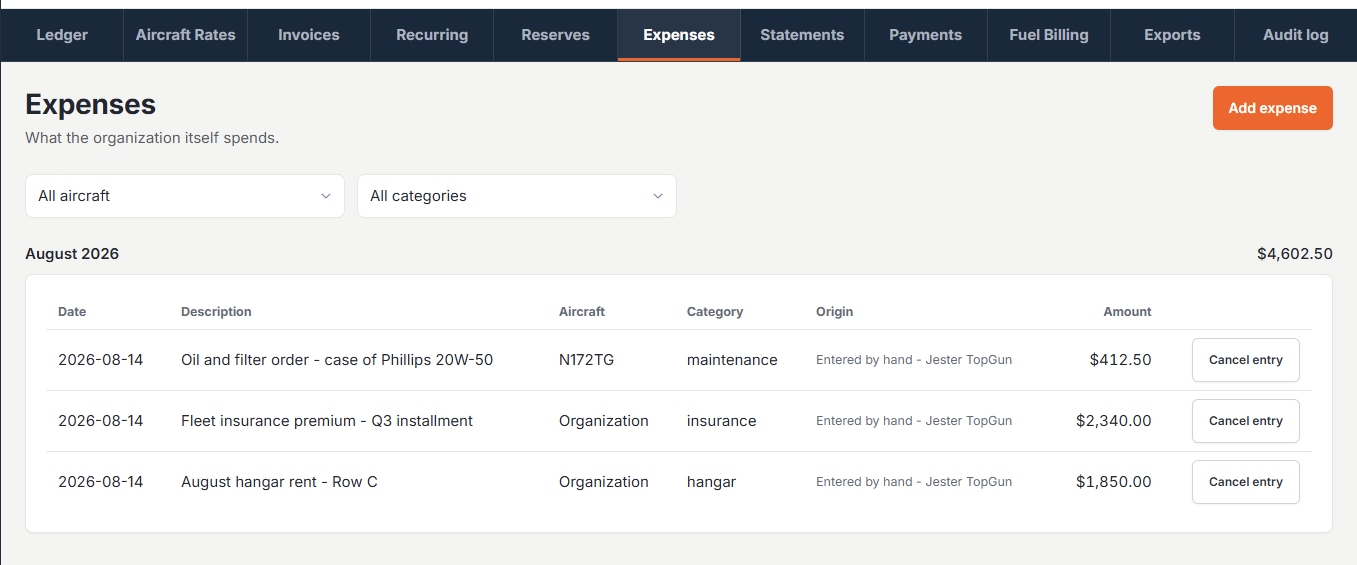
Expenses arrive from three feeds, and every row says which one it came from:
- Entered by hand - an admin adds an expense for anything the club paid for: the insurance bill, a hangar deposit, a subscription.
- Repairs billed to the organization - when maintenance billing is set to “Bill the organization”, a posted service writes its cost here instead of charging any member.
- The monthly fixed-cost schedule - each aircraft’s fixed monthly figure posts itself on the first of the month.
Adding an expense
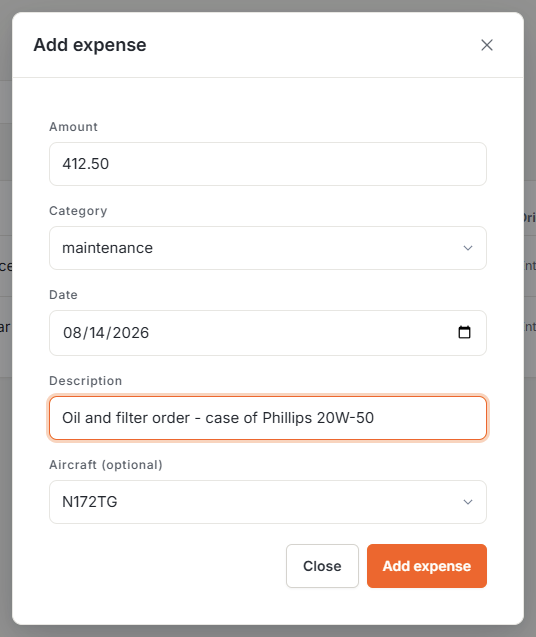
Open Billing then Expenses and click Add expense: an amount, a category (hangar, insurance, maintenance, subscription, financing, other, or type your own), a date, a description, and optionally the aircraft it belongs to. Leave the aircraft blank and the expense belongs to the organization as a whole. Entries group by month, and each month shows its total.
Fixing a mistake
Like the member ledger, the checkbook never erases anything. A wrong entry gets canceled rather than edited. Cancel entry asks for a reason and posts a visible correcting line for the same amount, dated the same day, so the month’s total nets back out. The original stays on screen, struck through, with the reason next to its mirror row.
Monthly fixed costs
Each aircraft’s Costs tab has a Fixed monthly costs schedule: an effective-from date, a monthly figure, and optional notes. Once a month, Resyrv writes one expense row per aircraft using the figure in force on the first, so raising the hangar rent next month never rewrites last year. A mid-month change applies from the following month; there’s no proration.
Billing repairs to the club
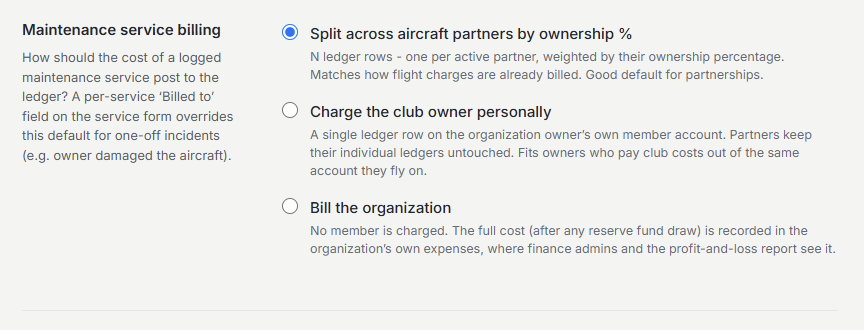
Under Settings then Maintenance Billing, choose who pays for maintenance: split across aircraft partners by ownership share, charge the club owner, or Bill the organization. On the third option, a posted service charges no member at all. The cost (after any reserve fund draw) lands here as an expense. A specific “Billed to” member on an individual service always wins over the default.
Where it shows up
The profit and loss report builds its expense side from the checkbook, grouped by category. Org-billed repairs report as “Maintenance (organization)” and the monthly schedule as “Aircraft fixed costs”. Months from before you started recording expenses keep the older estimate from your aircraft settings, clearly labeled, and a Notes section on the report calls out any gaps (a month the schedule missed, or an aircraft with no schedule at all), so an incomplete picture says so instead of printing a smaller number.
Was this page helpful?
Can’t find what you need? Contact us - a real person reads every message.