

Billing & Cost Sharing
Recurring Dues
Recurring dues pay for the fixed costs of a shared aircraft: membership, hangar, and reserves. Resyrv posts them to member ledgers automatically. Thus nobody has to ask for them each month.
Dues templates
A dues template sets a recurring charge with an amount and a posting schedule. Make one template for each type of due that your group collects. Examples are monthly membership, a hangar share, and an annual assessment.
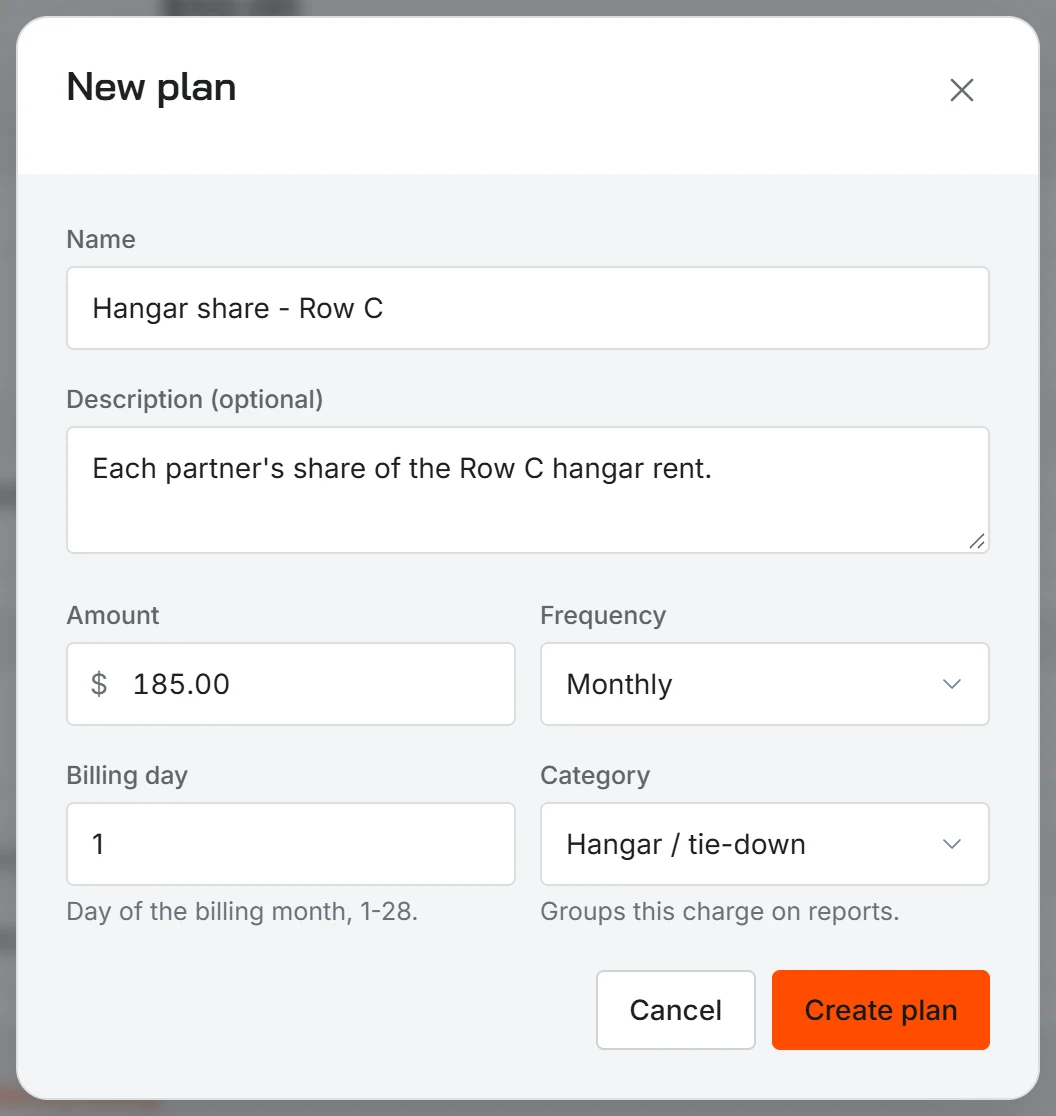
How to assign members
Assign a template to the members that it applies to. Not all members pay the same dues. Thus an assignment can have its own amount if the share of a member is different from the template default.
How dues post
On each scheduled date, Resyrv posts the dues charge to the ledger of each assigned member automatically. The charge is the same as all other ledger entries. It shows on invoices and statements and is part of the net balance of the member.
Autopay
Members with a saved payment method can enroll in autopay. Then their dues are paid automatically. For each assignment, you can override the usual autopay preference of a member. Use this if one member needs different treatment.
Managing Autopaythe admin view - who is enrolled, what is in the queue, and the review window.
The dues report
A separate dues report shows what Resyrv posted and what your organization collected. Thus you can see who is current and who is behind, and you do not have to read each ledger.
Was this page helpful?
Thanks - that helps. Tell us what was missing and we will fix the page.
Can’t find what you need? Contact us - a real person reads every message.