

Members & Roles
Roles & Permissions
Everything in Resyrv is permission-gated. Access groups bundle permissions into sensible defaults; custom groups cover the rest.
How permissions work
Every action (viewing the schedule, logging flights, approving external payments, grounding an aircraft) is a named permission. A member’s effective permissions are the union of their assigned access groups. The UI hides what a member can’t do, and the server enforces the same rules independently.
Built-in groups
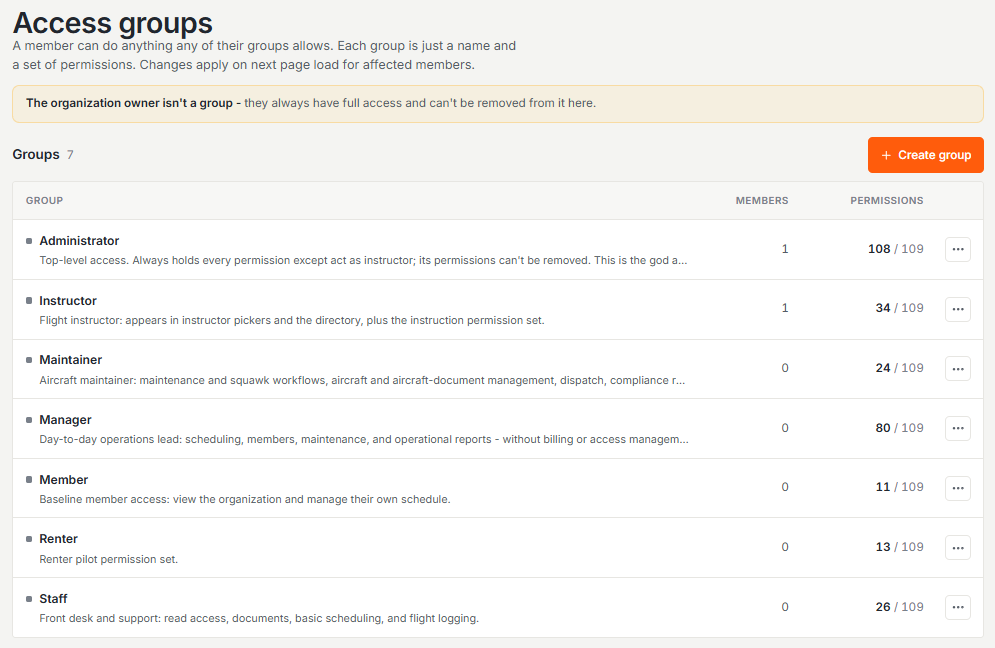
- Administrator - top-level access: every permission except acting as an instructor, and its permissions can’t be edited down.
- Manager - day-to-day operations lead: scheduling, members, maintenance, and operational reports, without billing or access management.
- Staff - front desk and support: read access, documents, basic scheduling, and flight logging.
- Member - baseline access: view the organization and manage their own schedule.
- Instructor - appears in instructor pickers and the directory, plus the instruction permission set.
- Maintainer - maintenance and squawk workflows, aircraft and aircraft-document management, dispatch, and compliance reporting.
- Renter - a renting pilot: book and manage their own reservations, view aircraft and documents, and file squawks.
The organization owner isn’t a group. The owner always holds full access, including subscription billing and the Stripe connection.
Custom roles
Roles & Access lets you build custom roles from the full permission catalog, organized into the same groups you see everywhere: scheduling, flights, maintenance, billing, training, and so on. A “maintenance officer” is often a member plus the maintenance group.
One person needs one more capability
Don’t clone a near-duplicate role. Permissions are the union of a member’s groups, so assign the extra group alongside what they already hold (or build a small custom group carrying just that capability) from Roles & Access.
Scheduling duties are separate from member administration
Booking a flight for somebody else, and releasing a flight you’re not on, are front-desk jobs. Neither one needs the ability to manage who belongs to the organization, so each has its own permission:
- Book for other members - name someone else as the pilot in command on a reservation. A dispatcher or an instructor can book on a member’s behalf without being handed the roster.
- Dispatch anyone’s flight - release, return, or cancel the dispatch of a flight you have no part in. This is the fleet-wide dispatch desk.
- Dispatch flights I’m on - release a flight where you are the pilot in command or the instructor. An instructor can now run the lessons they teach without fleet-wide rights.
By default these go to Administrator, Manager, Staff, and Instructor. Nobody lost access when they were introduced, because every group that could already dispatch across the fleet kept that ability.
The escalation guard
Nobody can assign a role more powerful than their own. The roles you can hand out are limited to those whose permissions are a subset of yours. A rogue admin can’t promote themselves, or a friend, to owner.
Debugging “I can’t see X”
- Open the member’s profile and check their effective permissions - it shows exactly what they can do and where each grant came from.
- Check their authorized locations - aircraft based elsewhere won’t appear for them.
- Only then suspect a bug.
Was this page helpful?
Can’t find what you need? Contact us - a real person reads every message.