

Flying & Logbook
Dispatch & Return
Dispatch is the desk-to-ramp flow. Send the aircraft out with its meter readings, take it back with the new ones, and the flight record and billing post themselves.
From reservation to returned aircraft
Dispatch runs on the reservation itself. A booked flight moves through three states: scheduled, dispatched, returned. When the pilot picks up the aircraft, the reservation is dispatched with the outgoing Hobbs and tach readings; when they’re back, the ending readings go in and Resyrv does the rest.
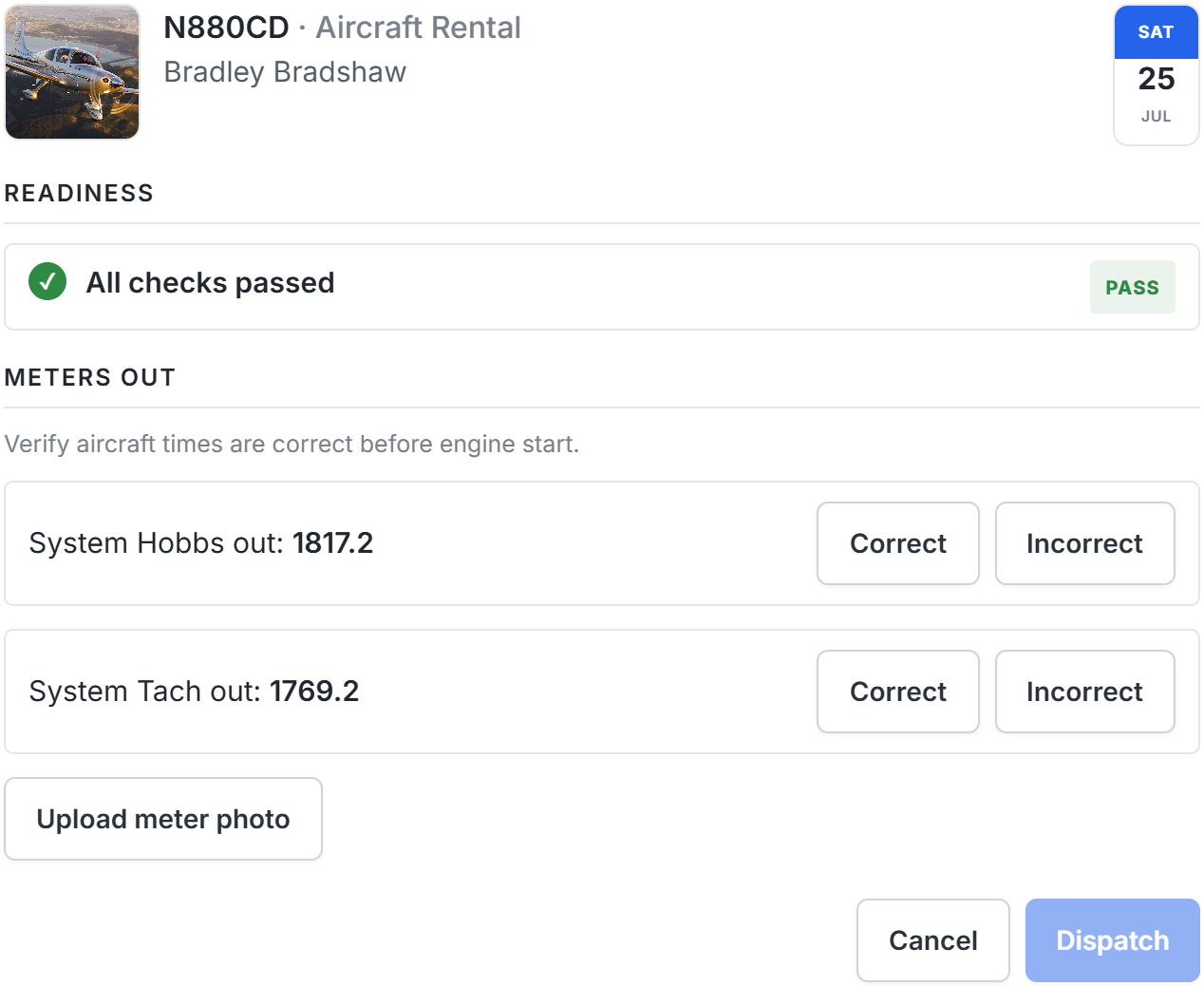
At return, the flight record is created from the out and in readings, the aircraft’s meters advance, the charges post to the right ledgers (the flying member’s on a rental, split across the owners on a partnership aircraft), and a draft entry appears in the pilot’s personal logbook ready to finish. Ground lessons complete without meters, because there’s nothing to read on a whiteboard.
Who can dispatch and return
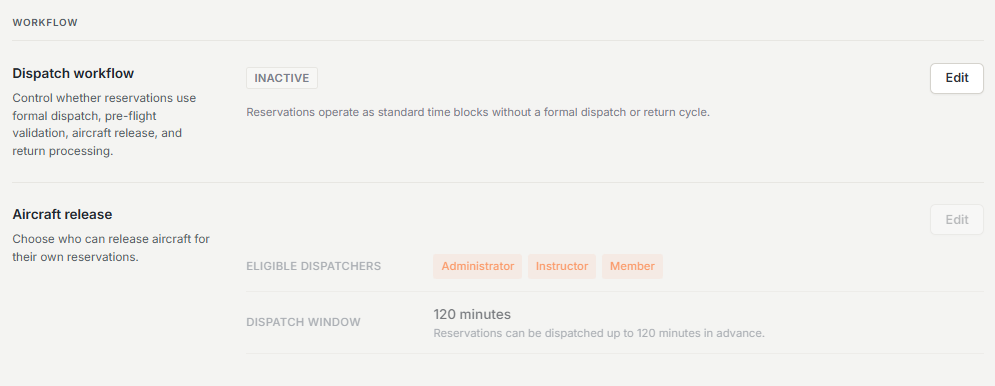
Dispatch is a per-organization feature. Turn it on in settings and decide who runs it. Two different jobs sit behind it, and they carry separate permissions.
- Running the desk - "Dispatch anyone’s flight" releases, returns, and cancels the dispatch of any reservation, whether or not the holder has anything to do with it.
- Releasing your own flight - the pilot in command, or the instructor teaching the lesson, can dispatch and return that flight when they hold "Dispatch flights I’m on" or their access group is on your organization’s authorized-dispatcher list.
Instructors count as being on the flight they teach, so a CFI can release, return, and cancel the dispatch of their own dual lessons without being given the whole fleet. Returning is open to the same people plus whoever dispatched the aircraft in the first place. Turning the dispatch workflow off never strands an aircraft that’s already out, because returning it doesn’t depend on the workflow being on.
Safety checks at dispatch
Before an aircraft goes out, Resyrv runs the dispatch checks your organization has switched on - maintenance posture, checkout approval, pilot credentials such as medical and flight review, and a maximum-balance cap. You can preview the findings before committing, and each check comes back one of two ways:
- Failures - hard stops, such as a grounded aircraft or a missing required signature. Dispatch is blocked until the condition is fixed; a failure cannot be overridden.
- Warnings - advisory findings that must be acknowledged before dispatch proceeds. An organization setting decides whether the dispatching member can acknowledge their own warnings or an admin has to.
Which checks run, and how hard they bite, is configured per organization. A two-partner ship can run with none; a flight school can run the full set. An aircraft with incomplete maintenance setup is never blocked for that reason alone; the guardrails tighten as the record fills in.
Which meters an aircraft tracks
Most aircraft have both a Hobbs and a tach, and Resyrv assumes both, though some do not. An aircraft with no tach, or one nobody reads, can be set to track only the meter you use, under the aircraft, Edit aircraft, Time tracking.
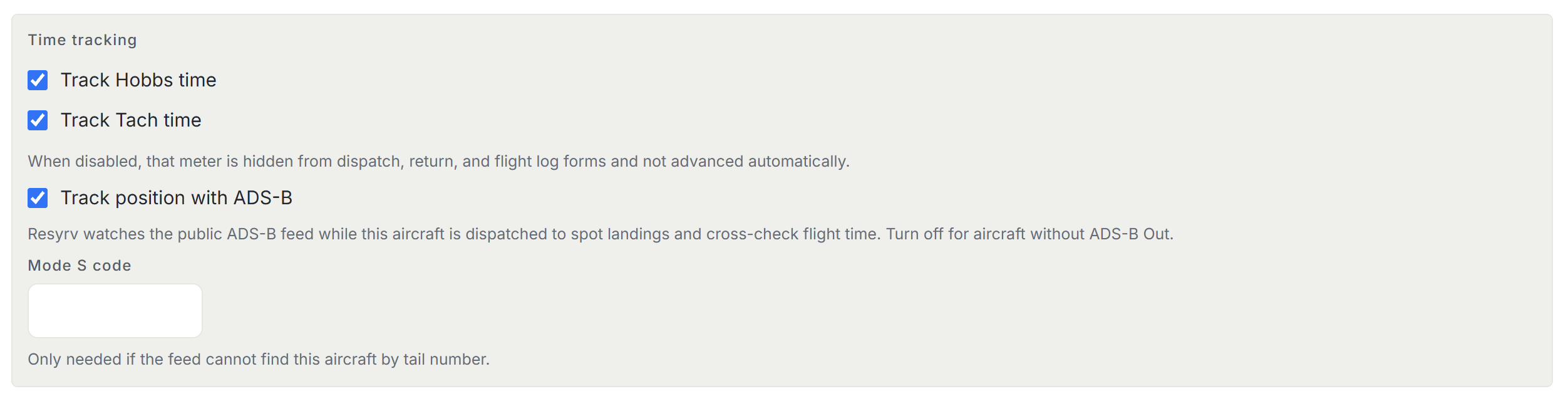
Switching a meter off removes its field from dispatch, return, and the flight log, on the web and on a phone. Nobody is asked for a number that does not exist, and the aircraft stops carrying a reading for it. A reading that arrives for an untracked meter anyway is discarded rather than stored, so it never turns up in a comparison later.
You cannot untrack the meter the aircraft bills on. If Billed on is set to Hobbs, Track Hobbs time stays on. Change the billing basis first, then the meter.
Meter discrepancies
If the outgoing readings don’t match the aircraft’s last known meters, Resyrv flags the discrepancy rather than silently absorbing it. Depending on your organization’s setting, the dispatcher files a meter exception explaining the difference. In the strictest mode, an authorized reviewer must approve the exception before the aircraft goes out.
Ending readings lower than the outgoing ones get the same treatment. A backward meter needs an approved exception, so a fat-fingered entry can’t rewind an aircraft’s times.
Dispatch signatures
For organizations that want a signed release, each flight type can require signatures - from the pilot, an instructor, a dispatcher, or any combination - before the aircraft goes out. Signing is by personal PIN. Each member sets their own 4-6 digit signature PIN in their profile, and the PIN belongs to the signer, so a dispatcher can collect an instructor’s signature by having them key in their own PIN at the desk.
On lessons, the instructor can also be asked to sign at return, acknowledging the flight and ground charges. A signature always covers a specific flight. If the reservation’s aircraft, pilot, instructor, or times change materially after signing, the signatures are voided and must be collected again.
Was this page helpful?
Can’t find what you need? Contact us - a real person reads every message.