

Getting Started
Invite Your Members
Members join by email invitation or a shared join link. The role you pick decides what they can do on day one, and you can adjust it later.
Two ways to invite
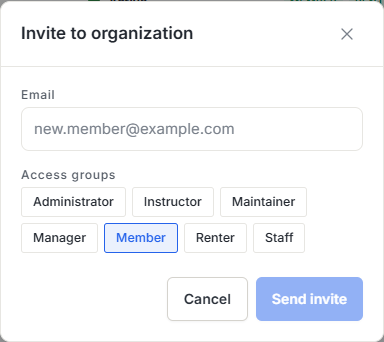
From Members you can send an email invitation to a specific address, or copy your organization’s join link and share it however you like. An email invite carries a role you choose; the join link brings people in as standard members you can promote afterwards.
Choosing a role at invite time
Every member has a primary role that sets their baseline authority:
- Owner - full authority; ownership is handled through a transfer flow, not the invite dropdown.
- Admin - operational authority across the organization.
- Manager - day-to-day operations lead, minus billing and role reassignment.
- Staff - non-pilot support such as a front desk or bookkeeper, read-only baseline.
- Member - the base pilot account most invitees land in.
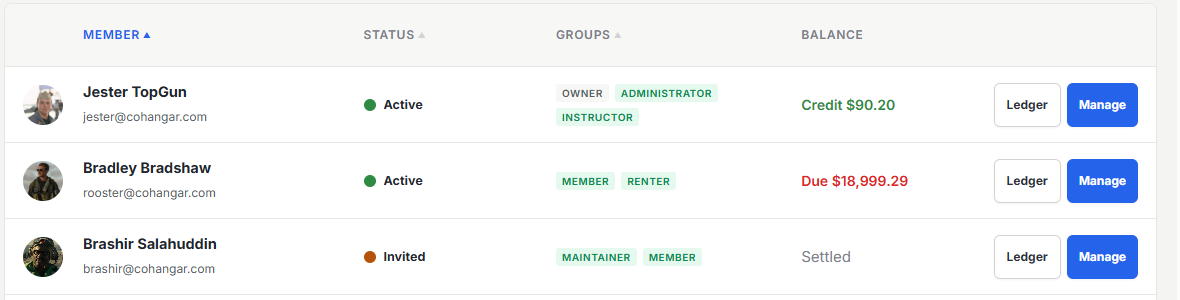
On top of the primary role, operational roles like instructor (CFI), renter, and maintenance layer on the specific tools a person needs. You can only hand out roles at or below your own authority, so no one can invite their way past you.
Accepting an invite
The invitee opens the link, signs into an existing account or creates one, and is dropped straight into your organization, with no separate approval step. The same link works whether the invite is to the organization or to a specific aircraft.
What a new member sees first
New members land on their personal overview: upcoming reservations, account balance, and anything that needs their attention. From there they can complete their pilot profile with the certificates, ratings, and medical dates that feed currency tracking.
Authorized locations
In multi-base organizations, each member carries a list of authorized locations. Aircraft based outside that list don’t appear as bookable, handy when insurance or club policy ties a member to one field.
Was this page helpful?
Can’t find what you need? Contact us - a real person reads every message.